<?xml version="1.0" encoding="iso-8859-1"?><!-- generator="b2evolution/1.8.2" -->
<rdf:RDF xmlns="http://purl.org/rss/1.0/" xmlns:rdf="http://www.w3.org/1999/02/22-rdf-syntax-ns#" xmlns:dc="http://purl.org/dc/elements/1.1/" xmlns:sy="http://purl.org/rss/1.0/modules/syndication/"					xmlns:admin="http://webns.net/mvcb/" xmlns:content="http://purl.org/rss/1.0/modules/content/">
		<channel rdf:about="http://blog.romanzolin.com/index.php">
			<title>Photography Things</title>
			<link>http://blog.romanzolin.com/index.php</link>
			<description>Posts about composition, digital effects, photoshop, photography business or links to interesting websites.</description>
			<dc:language>en-US</dc:language>
			<admin:generatorAgent rdf:resource="http://b2evolution.net/?v=1.8.2"/>
			<sy:updatePeriod>hourly</sy:updatePeriod>
			<sy:updateFrequency>1</sy:updateFrequency>
			<sy:updateBase>2000-01-01T12:00+00:00</sy:updateBase>
			<items>
				<rdf:Seq>
									<rdf:li rdf:resource="http://blog.romanzolin.com/index.php?title=3d_is_not_enough_meet_6d&amp;more=1&amp;c=1&amp;tb=1&amp;pb=1"/>
									<rdf:li rdf:resource="http://blog.romanzolin.com/index.php?title=understanding_light_stops&amp;more=1&amp;c=1&amp;tb=1&amp;pb=1"/>
									<rdf:li rdf:resource="http://blog.romanzolin.com/index.php?title=serious_about_becoming_a_pro_wedding_pho&amp;more=1&amp;c=1&amp;tb=1&amp;pb=1"/>
									<rdf:li rdf:resource="http://blog.romanzolin.com/index.php?title=top_10_ridiculous_wedding_customs&amp;more=1&amp;c=1&amp;tb=1&amp;pb=1"/>
									<rdf:li rdf:resource="http://blog.romanzolin.com/index.php?title=old_image_technique&amp;more=1&amp;c=1&amp;tb=1&amp;pb=1"/>
								</rdf:Seq>
			</items>
		</channel>
		
		<item rdf:about="http://blog.romanzolin.com/index.php?title=3d_is_not_enough_meet_6d&amp;more=1&amp;c=1&amp;tb=1&amp;pb=1">
			<title>3D Is Not Enough - Meet 6D</title>
			<link>http://blog.romanzolin.com/index.php?title=3d_is_not_enough_meet_6d&amp;more=1&amp;c=1&amp;tb=1&amp;pb=1</link>
			<dc:date>2008-08-11T12:42:31Z</dc:date>
			<dc:creator>Roman</dc:creator>
			<dc:subject>Equipment</dc:subject>
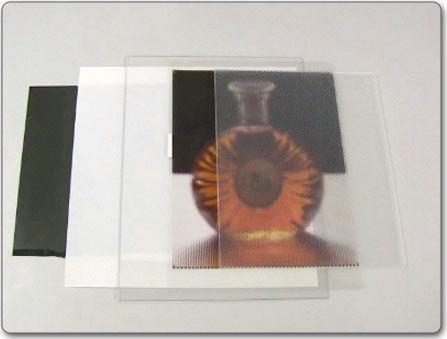
			<description>http://web.mit.edu/newsoffice/2008/camera-0807.html 
Who would have known that 3D imaging is not the real thing. Well, it is real and there are many technologies that produce 3D images. But the 3D concept is not developed to be fully realistic. What else could be there, you may ask. It's simple:
To create "the ultimate synthetic display", says Ramesh Raskar, an associate professor at the MIT Media Lab, "the display should respond not just to a change in viewpoint, but to changes in the surrounding light". 
Read the article and watch the video to see what's the next step for 3D (the 6D imaging).</description>
			<content:encoded><![CDATA[<p><a href="http://web.mit.edu/newsoffice/2008/camera-0807.html">http://web.mit.edu/newsoffice/2008/camera-0807.html</a></p><p><a href="http://web.mit.edu/newsoffice/2008/camera-0807.html" rel="external"><img src="http://blog.romanzolin.com/pictures/preview/6d_image.jpg" alt="6D Image" title="6D Image" /></a><br />
Who would have known that 3D imaging is not the real thing. Well, it is real and there are many technologies that produce 3D images. But <em>the 3D concept is not developed to be fully realistic</em>. What else could be there, you may ask. It's simple:</p>
<blockquote><p>To create "the ultimate synthetic display", says Ramesh Raskar, an associate professor at the MIT Media Lab, "<strong>the display should respond not just to a change in viewpoint, but to changes in the surrounding light</strong>".</p></blockquote><p> <br />
<a href="http://web.mit.edu/newsoffice/2008/camera-0807.html" rel="external">Read the article and watch the video</a> to see what's the next step for 3D (the <strong>6D imaging</strong>).</p>]]></content:encoded>
		</item>

		
		<item rdf:about="http://blog.romanzolin.com/index.php?title=understanding_light_stops&amp;more=1&amp;c=1&amp;tb=1&amp;pb=1">
			<title>Understanding Light Stops</title>
			<link>http://blog.romanzolin.com/index.php?title=understanding_light_stops&amp;more=1&amp;c=1&amp;tb=1&amp;pb=1</link>
			<dc:date>2008-07-25T12:15:50Z</dc:date>
			<dc:creator>Roman</dc:creator>
			<dc:subject>General Photography</dc:subject>
			<description>http://cameradojo.com/2008/07/24/understanding-light-stops/ When you step into the photography realm you hear new words, meaning of which eludes you. One of them, so simple, and still so mysterious is the "f-stop" (or simply "stop"). What does it mean? What does it measure or represent? Read the article "Understanding Light Stops" to be in the know.</description>
			<content:encoded><![CDATA[<p><a href="http://cameradojo.com/2008/07/24/understanding-light-stops/">http://cameradojo.com/2008/07/24/understanding-light-stops/</a></p><p>When you step into the photography realm you hear new words, meaning of which eludes you. One of them, <strong>so simple, and still so mysterious is the "f-stop"</strong> (or simply "stop"). What does it mean? What does it measure or represent? Read the article "<a href="http://cameradojo.com/2008/07/24/understanding-light-stops/" rel="external">Understanding Light Stops</a>" to be in the know.</p>]]></content:encoded>
		</item>

		
		<item rdf:about="http://blog.romanzolin.com/index.php?title=serious_about_becoming_a_pro_wedding_pho&amp;more=1&amp;c=1&amp;tb=1&amp;pb=1">
			<title>Serious about becoming a Pro Wedding Photographer?</title>
			<link>http://blog.romanzolin.com/index.php?title=serious_about_becoming_a_pro_wedding_pho&amp;more=1&amp;c=1&amp;tb=1&amp;pb=1</link>
			<dc:date>2008-07-18T11:29:18Z</dc:date>
			<dc:creator>Roman</dc:creator>
			<dc:subject>Wedding Photography</dc:subject>
			<description>http://frederickvan.com/blog/2008/07/17/robert-evans-celebrity-wedding-photographer/ 
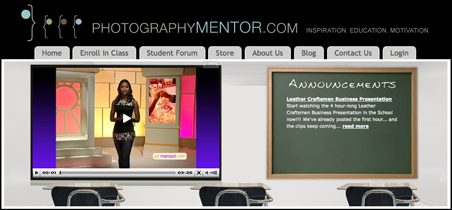
Well, it may be just your day and your way. Robert Evans photographed weddings for the likes of Tom Cruise and Katie Holmes, Brad Pit and Jennifer Aniston, and has made portraits of celebs like George Lopez, MC Hammer. And now he presents you with his new website PhotographyMentor.com.

Here is how they describe the website:
Through professionally produced Video Lessons from Award Winning Documentary Film and Television Editors, you&#8217;ll &#8220;Get inside the Head&#8221; of these Pros as they demonstrate and teach you everything you need to know to succeed; including Lighting, Image editing, Post Processing, Business and Branding, Client Relations, and Much Much More!

Watch more about the website in this video.</description>
			<content:encoded><![CDATA[<p><a href="http://frederickvan.com/blog/2008/07/17/robert-evans-celebrity-wedding-photographer/">http://frederickvan.com/blog/2008/07/17/robert-evans-celebrity-wedding-photographer/</a></p><p><a href="http://www.photographymentor.com/" rel="external"><img src="http://blog.romanzolin.com/pictures/preview/photo_mentor.png" alt="PhotographyMentor.com" title="Photography Mentor" /></a><br />
Well, it may be just your day and your way. Robert Evans photographed weddings for the likes of Tom Cruise and Katie Holmes, Brad Pit and Jennifer Aniston, and has made portraits of celebs like George Lopez, MC Hammer. And now he <a href="http://frederickvan.com/blog/2008/07/17/robert-evans-celebrity-wedding-photographer/" rel="external">presents</a> you with his new website <a href="http://www.photographymentor.com/" rel="external">PhotographyMentor.com</a>.</p>

<p>Here is how they describe the website:</p>
<blockquote><p>Through professionally produced Video Lessons from Award Winning Documentary Film and Television Editors, you&#8217;ll &#8220;Get inside the Head&#8221; of these Pros as they demonstrate and teach you everything you need to know to succeed; including Lighting, Image editing, Post Processing, Business and Branding, Client Relations, and Much Much More!</p></blockquote>

<p>Watch more about the website in <a href="http://frederickvan.com/blog/2008/07/17/robert-evans-celebrity-wedding-photographer/" rel="external">this video</a>.</p>]]></content:encoded>
		</item>

		
		<item rdf:about="http://blog.romanzolin.com/index.php?title=top_10_ridiculous_wedding_customs&amp;more=1&amp;c=1&amp;tb=1&amp;pb=1">
			<title>Top 10: Ridiculous Wedding Customs</title>
			<link>http://blog.romanzolin.com/index.php?title=top_10_ridiculous_wedding_customs&amp;more=1&amp;c=1&amp;tb=1&amp;pb=1</link>
			<dc:date>2008-07-16T20:09:57Z</dc:date>
			<dc:creator>Roman</dc:creator>
			<dc:subject>Wedding Photography</dc:subject>
			<description>http://tinyurl.com/6bkjn3 AskMen.com names top 10 customs that are considered pointless (ridiculous to be precise):

Despite what the wedding planners say, many wedding customs are pretty stupid and pointless. Some ridiculous wedding customs are older, established traditions and others are newer trends, but none of them make much sense -- especially for guys.</description>
			<content:encoded><![CDATA[<p><a href="http://tinyurl.com/6bkjn3">http://tinyurl.com/6bkjn3</a></p><p>AskMen.com names <a href="http://tinyurl.com/6bkjn3" rel="external">top 10 customs that are considered pointless</a> (ridiculous to be precise):</p>

<blockquote><p>Despite what the wedding planners say, many wedding customs are pretty stupid and pointless. Some ridiculous wedding customs are older, established traditions and others are newer trends, but none of them make much sense -- especially for guys.</p></blockquote>]]></content:encoded>
		</item>

		
		<item rdf:about="http://blog.romanzolin.com/index.php?title=old_image_technique&amp;more=1&amp;c=1&amp;tb=1&amp;pb=1">
			<title>Old Image Technique</title>
			<link>http://blog.romanzolin.com/index.php?title=old_image_technique&amp;more=1&amp;c=1&amp;tb=1&amp;pb=1</link>
			<dc:date>2008-07-16T14:00:47Z</dc:date>
			<dc:creator>Roman</dc:creator>
			<dc:subject>Photoshop and Effects</dc:subject>
			<description>http://www.cupofidea.com/howto/300 
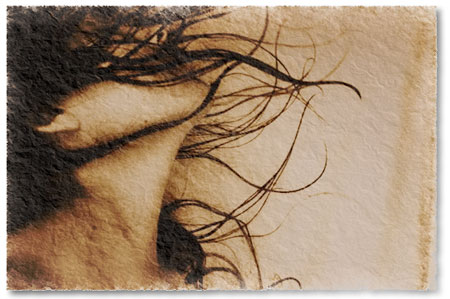
In the linked article at "Cup Of Idea" website you will find the tutorial on how to create a nicely looking old image out of a new one. I took a liberty to make some further adjustments to the final result, which I want to share with you.

Here is the layer palette:


My modifications are as follows:

  Add a texture of an old paper as the semi-transparent background (50% opacity)
  Make the image itself brighter by pulling up the upper part of the curve
  Set the blending mode of the image to Multiply
  Add atop an empty layer and use Filter>Render>Clouds
  Blur somewhat the clouds and scale up to make the clouds bigger
  Set the blending mode of the clouds layer to Color Burn


And that's pretty much it, except that I added a layer mask to the image (based on the texture) so the edges are somewhat washed out and bleak. 

Note: This beautiful photograph is taken from the tutorial. I hope I am not offending anyone by doing so.</description>
			<content:encoded><![CDATA[<p><a href="http://www.cupofidea.com/howto/300">http://www.cupofidea.com/howto/300</a></p><p><a href="http://www.cupofidea.com/howto/300" rel="external"><img src="http://blog.romanzolin.com/pictures/preview/old_image_technique.jpg" alt="Old Image" title="Old Image" /></a><br />
In the <a href="http://www.cupofidea.com/howto/300" rel="external">linked article</a> at "Cup Of Idea" website you will find the tutorial on how <strong>to create a nicely looking old image out of a new one</strong>. I took a liberty to make <em>some further adjustments</em> to the final result, which I want to share with you.</p>

<p>Here is the layer palette:<br />
<img src="http://blog.romanzolin.com/pictures/preview/old_image_layers.png" alt="Old Image layers" title="Old Image layers" /></p>

<p>My modifications are as follows:</p>
<ul>
  <li>Add a texture of an old paper as the semi-transparent background (50% opacity)</li>
  <li>Make the image itself brighter by pulling up the upper part of the curve</li>
  <li>Set the blending mode of the image to Multiply</li>
  <li>Add atop an empty layer and use Filter>Render>Clouds</li>
  <li>Blur somewhat the clouds and scale up to make the clouds bigger</li>
  <li>Set the blending mode of the clouds layer to Color Burn</li>
</ul>

<p>And that's pretty much it, except that I added a layer mask to the image (based on the texture) so the edges are somewhat washed out and bleak. </p>

<p><cite><strong>Note:</strong> This beautiful photograph is taken from the tutorial. I hope I am not offending anyone by doing so.</cite></p>]]></content:encoded>
		</item>

		</rdf:RDF>